
We sent the quote… and never heard back.
Quotes follow themselves up, up to five times, until the client answers. One tap in the email approves.
The whole office for renovation and trade businesses. Follow-ups and payment reminders send themselves.
Sheet A-02Sound familiar?
We sent the quote… and never heard back.
Quotes follow themselves up, up to five times, until the client answers. One tap in the email approves.
The work's done. The invoice is still “going out this week”.
The quote becomes the invoice in one click, and reminders chase it until it's paid.
Quotes get written at the kitchen table at 10 pm.
Price the job in minutes and send a branded PDF: numbered, taxed, done.
The job lives in texts, voicemails and a notebook on the dash.
One record per job: client, scope, numbers, schedule, and every step logged.
The crew calls the office for the address. Again.
Everyone sees their day. The crew gets the address, the scope and their pay.
Leads stuck to the fridge door until there's time.
Every lead keeps its next step and date in front of you until it's won or closed.
Sheet A-03How it works
Quote
Price the job and send it. Your client receives a branded quote with your logo and colours, PDF attached, and answers with a single tap. No accounts to create, no back-and-forth.
Follow-up
Quiet clients are where work slips away. Officeology follows up on unanswered quotes on the schedule you set, with the same one-tap answer, and stops the moment they reply.
Approval
The client's answer lands straight in your pipeline. The job moves to Approved, the client gets a confirmation, and all that's left is picking the date and the crew.
Invoice
Everything on the quote carries over. When the work is done, send the invoice in one click, copied automatically to the building's property manager when there is one.
Payment
Unpaid invoices get polite, automatic reminders until the payment is recorded. No awkward calls, no spreadsheet of who owes what.
Sheet A-04The screens
Officeology's own screens, running a sample renovation company.
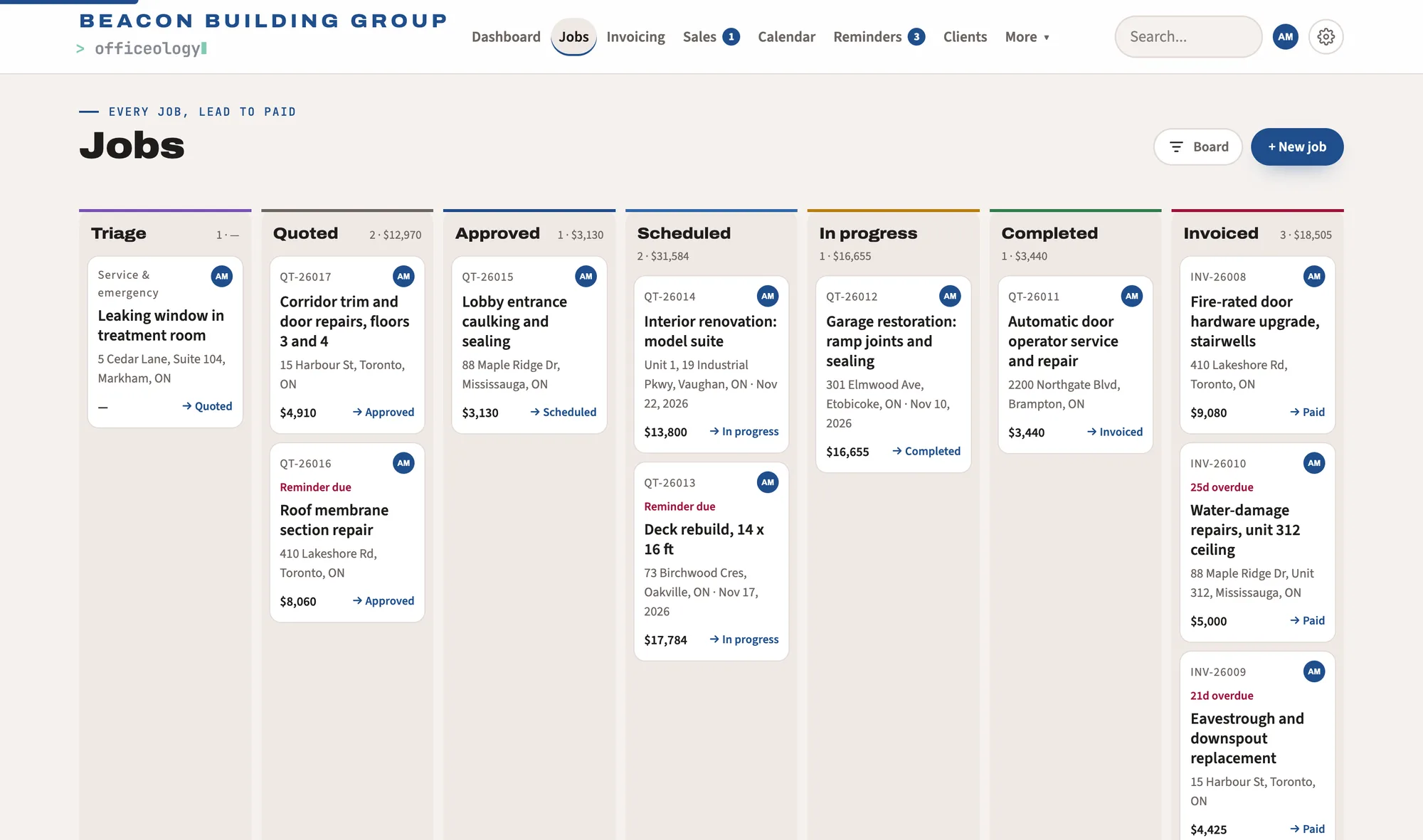
Every job from first call to paid, on one board that keeps itself up to date. Sample data shown.
Sheet A-05Everything else
Every job from first call to paid on one board. Pricing it, dating it or a client's answer moves it on.
Jobs, site visits and appointments on one shared calendar, with each person's day in view.
Callbacks, renewals and repeating tasks reappear when they're due. Nothing depends on memory.
Every enquiry and its follow-ups, then a client and a job in one step.
What's owing, what's paid and what each job cost. Expenses, HST and payroll estimates at Ontario rates.
Your logo, colours and details on every quote, invoice and email your clients see.
Owner, Manager, Sales, Finance and Trades each see what their work needs.
Import clients and jobs from a spreadsheet or QuickBooks. Export everything whenever you like.
Sheet B-01For the crew
Trades get a focused view of their assigned work: the address, the scope, the notes, the date and their own pay. Prices, invoices and other jobs stay with the office.
Sheet B-02Your data
A
Your records and files are stored in Canada.
B
The database itself keeps each business to its own records, and each person to what their role allows.
C
We never sell your information, and there are no advertising or analytics trackers.
D
Export everything, at any time, in formats your accountant already uses.
Sheet A-06Pricing
Free
$0
No time limit · up to 3 people
Corporate
$25 / month
Plus tax. Or $250 a year. Unlimited people, cancel anytime.
2 months free yearlyOfficeology already works in any phone's browser. A native iPhone app is on its way, with the full office for your team and a simple day view for your crew.
Yes. Teams of up to 3 can manage clients, jobs, quotes, invoices, scheduling and finances, with every automated email included, at no cost and with no time limit. The Corporate plan is only needed for larger teams, AI, job photos and receipt scanning.
Follow-ups on quotes that haven't been answered, a confirmation once a client approves or declines, and payment reminders on unpaid invoices, all on the schedule you choose. Quotes and invoices themselves go out with one click, so you always decide when a client hears from you.
No. They approve or decline a quote straight from the email, and invoices arrive as a PDF attachment for their records.
Upgrade to Corporate from Settings → Subscription: $25 a month or $250 a year, plus tax (13% HST in Ontario), paid securely through Stripe. Your records stay exactly where they are; you gain unlimited people, AI, job photos and receipt scanning, and you can switch or cancel at any time.
Yes. Import from a spreadsheet (CSV or Excel) or a QuickBooks export, and export everything again at any time.
In Canada. Our privacy policy lists every service that handles your information, and why.
Set up your business in minutes. Free for teams of up to 3.


